Docs
Dual Rig & Dual Amp
Use two rigs when you want two amp sounds at the same time. Ardor shows both lanes side by side from the split to the stereo output.
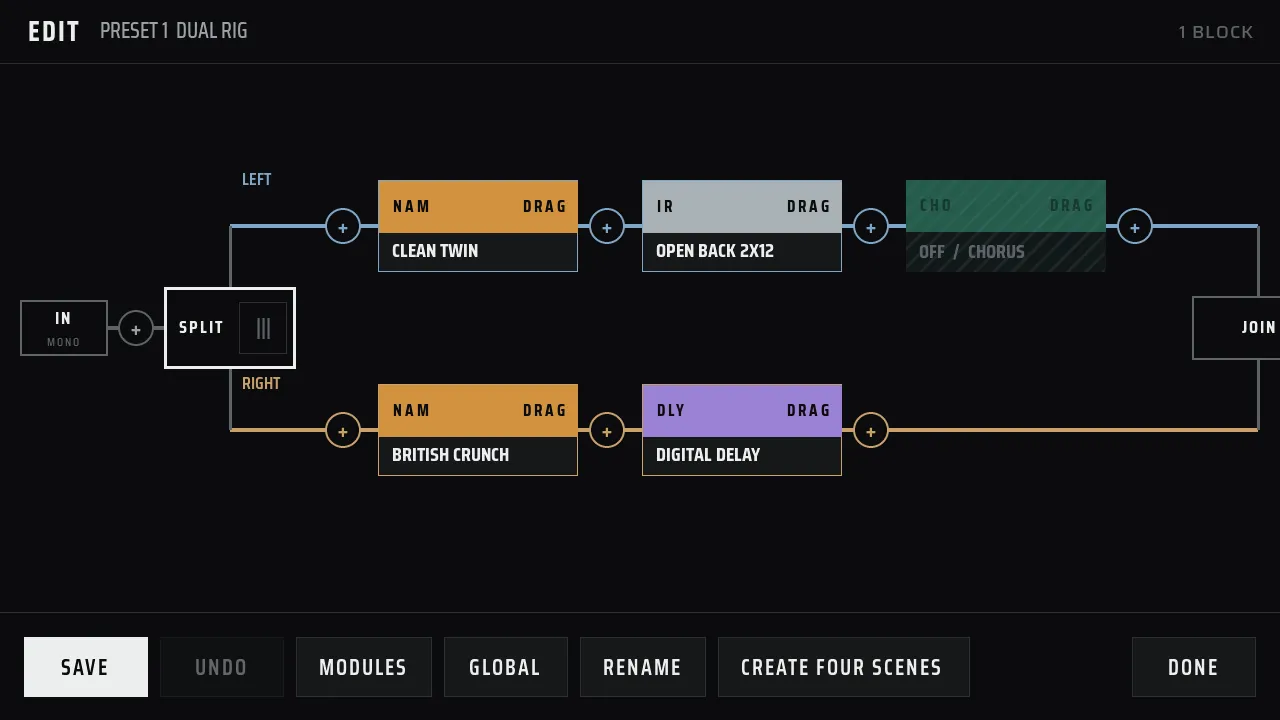
Choose the layout
| Block | Use it when you want to |
|---|---|
| Dual Amp | Use two fixed amp and cabinet lanes with simple controls. |
| Dual Rig | Build a different effect chain on the left and right side. |
Dual Amp
Dual Amp has two lanes. Both lanes receive the guitar signal. The left lane goes to the left output, and the right lane goes to the right output. Choose an amp model and cabinet sound for each side.
A Dual Amp block replaces the normal amp and cabinet blocks in that preset. Do not add a separate amp or cabinet block to the same preset.
Dual Rig
Dual Rig gives each side its own chain. You can use a different amp, cabinet, delay, or other effect on each side. Ardor merges the two lanes into a stereo output.
- Add a Dual Rig block to the main chain.
- Add blocks to the Left lane.
- Add blocks to the Right lane.
- Save the preset, then apply it.
- Both lanes receive the same mono guitar signal.
- Each lane runs from left to right.
- The left lane feeds the left output.
- The right lane feeds the right output.
- Both lanes need at least one block.
The editor marks the layout with SPLIT, LEFT, RIGHT, and JOIN. This keeps the two lanes clear while you edit.
Good uses for two rigs
- Send a clean amp to the left and a driven amp to the right.
- Use different cabinet sounds on the two sides.
- Keep one side dry and add delay or reverb to the other side.
- Blend two sounds for a wider stereo part.
Read Signal Chain & Routing for the normal left-to-right path, or read Presets & Storage for the advanced preset details.
Advanced: processing on the Raspberry Pi
Ardor can process the two lanes at the same time on a four-core Raspberry Pi 4. If the parallel worker is not available, Ardor processes the lanes one after the other. The pedal keeps playing in both cases.
The release image enables parallel processing with these settings:
| Setting | Value |
|---|---|
| Parallel rigs | PARALLEL_RIGS=1 |
| Audio CPU | AUDIO_CPU=2 |
| Rig worker CPU | RIG_WORKER_CPU=3 |