Docs
Signal Chain & Routing
Ardor shows the signal path from left to right. Place blocks in the order that you want them to process your sound.
Follow the signal
Your guitar enters at IN. Ardor sends the signal through each block in order, then sends it to OUT. The safety limiter stays at the end.
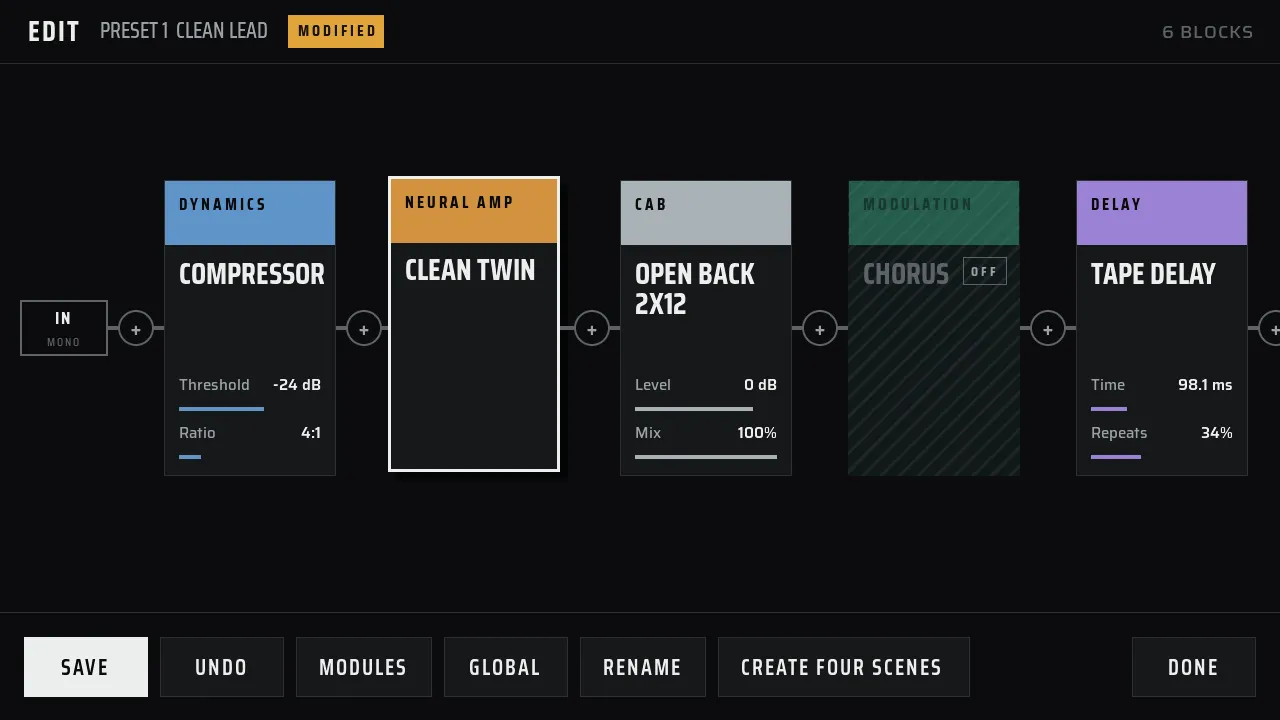
Build a sound from left to right
- Start with the input.
- Add drive, amp, and cabinet blocks.
- Add modulation, delay, or reverb after the cabinet.
- End at the output.
Drag a block to change its place. Tap + to add a block. The editor shows the chain from left to right, so you can see what happens before and after each block.
Use two lanes
Add a Dual Rig when one chain is not enough. The guitar signal enters the split, then runs through two lanes. The left lane feeds the left output. The right lane feeds the right output. The lanes join as a stereo signal.
See Dual Rig & Dual Amp for the two-lane layout.
Keep the level clear
Use the input level to change how hard you drive the amp model. Use the output level to change the final level. If the sound overloads, reduce the control that comes before the overload.
| Control | What it changes |
|---|---|
| Input gain | The level that enters the amp model. |
| Output gain | The level after the cabinet. |
| Safety limit | A protective ceiling at the end of the chain. |
If the amp sound loses its character, lower the input gain. If the amp sound is right but the output clips, lower the output gain. The clip meter helps you find the first overload.
Choose the right effect order
- Put the amp model before its cabinet sound.
- Put the cabinet before stereo delay and reverb.
- Put modulation where you want the movement in the sound.
- Use Dual Rig when you need separate left and right amp paths.
Some blocks can accept either mono or stereo sound. Ardor applies the correct conversion when you use a block in a valid place.
See the Effects Reference for every block, or use the Manager App to edit a long chain on your computer.
Advanced: mono and stereo rules
- AMP and cabinet stages use a mono signal. An amp stage can fold a stereo input to mono.
- A cabinet should come before stereo effects.
- Modulation keeps the stereo field that it receives.
- Delay and reverb keep the dry stereo signal and create their own stereo wet signal.
- Dual Amp and Dual Rig create stereo with separate left and right paths.
Input mode
An amp model can choose how it folds a stereo input into mono:
| Mode | Input used |
|---|---|
| sum | The average of left and right. This is the default. |
| left | The left channel. |
| right | The right channel. |
Advanced: preset field names
| Field | Location | Purpose |
|---|---|---|
| inputGainDb | Before the amp model | Set the drive into the model. |
| outputGainDb | After the cabinet | Set the output level. |
| safetyLimitDb | End of chain | Set the protective ceiling. The default is −1 dBFS. |